
As you know, if you add “&fmt=18” at the end of a YouTube video url you can watch it in higher resolution if available.
Normal YouTube url:
http://www.youtube.com/watch?v=ckKFxMw6z0c
High resolution YouTube url:
http://www.youtube.com/watch?v=ckKFxMw6z0c&fmt=18
This also means that you can download the videos in the same high quality, but as mp4 in stead of flv.
To download in flv format:
http://www.youtube.com/get_video?video_id=ID&t=SIG
To download in mp4 format:
http://www.youtube.com/get_video?fmt=18&video_id=ID&t=SIG
ID is the video`s identification value and SIGNATURE is a value that prevents you from downloading the file just by knowing the ID.
You can create this url by looking at the source code of a YouTube video page or, sere`s the short way:
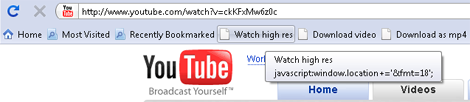
Just drag these links to your bookmarks toolbar (in Firefox, Safari) or right-clicking and add them to your favorites (in Internet Explorer, Opera) and click on them when you`re watching a video from youtube.
Watch high res Download video Download as mp4
just replace youtube.com with tubezoid.com in video url and you will get immediately download