
Do you have a blog you run that is authored by multiple authors?If so, have you wondered how you can run a revenue sharing program so that everyone is equally compensated? Has the thought about coding a plugin given you the creeps? Well, no more. I have done all the hard work. Announcing AdSense Revenue Sharing, a free adsense revenue sharing plugin for wordpress.
AdSense Revenue Sharing is a wordpress plugin which allows you to easy display ads in your posts by using a quicktag and share your adsense impressions with your friends and co-authors.
To dispaly the ads you can either insert <!–adsense–> anywhere in your post or use the quicktag button.
For configuration go to Options>Revenue Sharing
Usage:
- Download, unzip, copy adsense-revenue-sharing directory to your plugin folder.
- Go to your wordpress admin panel, click on Plugins and activate Adsense Revenue Sharing.
- Go to Options>Revenue Sharing and configure the plugin.
- Top left is a default publisher id. Delete it or modify it with your own.
- Add other publisher codes from your co-authors if available.
- Edit the adsense ad setting (border, color etc); do not fill the ad channel if you added more than one publisher id.
- Select yes or no for the All pages option.
- Click Update AdSense Settings.
How it works:
There are two ways you can use this plugin.
- You can use the quicktag and insert an ad wherever you want in your post.
- Second, you can use the All pages setting.
By choosing number 2 one add will appear at the end of every single post and page.
By using either one of the above, on the pages that have more than one post like main page or the archive page, only the first post on the page will display one ad. Google only lets you display 3 ads at a time so it`s better t show one ad than to show 3 ads and 4 to 7 empty spaces.
Using two or more authors at once, everyone will get equal ad exposure. So if there are 2 authors, each of then will get 50%. For 4 authors the percentage will be 25% for each and so on. Every time the page loads a different author id will be used to display the ad/ads. Remember due to google only one publisher id is allowed to be used on a page. So if you want to add other ads in your design read the google TOS first, you will have to disable the plugin or use only one publisher id with it.
Remember if you have 2 or more publishers, the one with less hits will be displayed.
EX.: 5 publishers, someone visits the website and the id from no.1 is shown; for the next 4 visits no.1 will not be shown, meaning that the other 4 will be, randomly; now the hit count is equal again and the pub. no.1 will be shown again; every id will be shown once every 5 hits.
If you want to add another authors publisher id and you already have one or more, either reset the other publishers hit count, or insert and equal number with the current hit count of the existing ones to the newly added. If you don`t, the next thing will happen:
Ex.: you have 8 publishers and each of them has 1000 hits; you add another one with 0 hits. If you don`t reset the hit count for the other 8 or insert 1000 as the new publishers hit value, ads with his id will show up until he reaches 1000 hits.
Features:
- Nice admin area with live ad preview
- Add as many co-authors as you desire
- Simple add/edit/delete/reset co-authors
- Fast insert your ads in you posts and pages
- “Show all” feature to insert one ad at the end of every post
Screenshots:
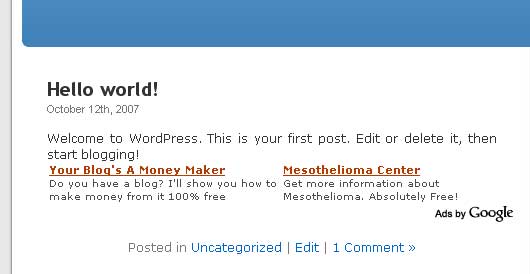

Requires:
- WordPress: 2.3 or higher
Compatible up to:
- WordPress: 2.5.1
Release info:
- Date: October 16th, 2007
- Version: 1.0
- Date: October 24th, 2007
- Version: 1.1
- Date: April 23rd, 2008
- Version: 1.2
Download:
- AdSense Revenue Sharing 1.0
- AdSense Revenue Sharing 1.1
- AdSense Revenue Sharing 1.2
Installation:
- Unzip the downloaded package and upload the AdSense Revenue Sharing folder into your WordPress plugins folder
- Log into your WordPress admin panel
- Go to Plugins and “Activate” the plugin. “Revenue Sharing” will now be displayed in your Options section
- Set up as many AdSense Account ID`s under Options -> Revenue Sharing
- Edit your Ad options under under Options -> Revenue Sharing
Features in version 1.1
- Fixed add hit count
- Fixed ad preview
- Once you click outside the field you edited the preview will be updated. Once you save it, it will show the new data.
- Fixed multiple post page display
- Pages that show more than one post like main page, archive page, search page will only display ads in the latest
post added on the certain page (first post on page)
- Pages that show more than one post like main page, archive page, search page will only display ads in the latest
- Added smart ad count
- If you accidentally enter more than 3 quicktags in a post it ignores them and ads one ad at the end of the post.
Same thing happens on multiple post pages.
- If you accidentally enter more than 3 quicktags in a post it ignores them and ads one ad at the end of the post.
- Added new option ->Show all
- If you enable this option all the quicktags you added will be ignored and one ad will be placed at the end of every
post/page. When you disable this options ads will be shown again only in posts that have a quicktag.
- If you enable this option all the quicktags you added will be ignored and one ad will be placed at the end of every
New in version 1.2
- Fixed it to work with wp 2.5
- Added new option ->Position
- You can now choose where to place the ad when the “Show all” function is on.
I.E: top, bottom, top left, top right, bottom left, bottom right
- You can now choose where to place the ad when the “Show all” function is on.
Ok, everything is great, but:
– I created a co-author.
– I logged on as the co-author and used the Adsense button to insert the tag.
– Ad is displayed in the Author article but is not using the authors Adsense ID but the main Adsense ID.
Do I need to put some number in HITS?
The ID is displayed randomly. If you have 2 authors the ads will contain each of the id`s in an equal manner. Go to the page you put the ad on ad refresh it a couple of times then go to the Revenue Sharing admin and look at the stats. Compare the stats with the ones in your adsense account. You are probably seeing the same id on the page because of your browsers cache. If you`re using firefox select the ad, right click and select View Selection Source. Do this a few times after refreshing the page and you should see.
Thanks for the feedback.
Hello,
Is this a continuation or update of this plugin?
harleyquine.com/php-scripts/author-adsense-plugin/
can i manage other ads? likes adbrite,adengage etc
No, just adsense ads, that`s why it`s called adsense revenue sharing 🙂
i want manage other ads,but i don’t know php,can u make one plugin? thanks
Hello gestroud, this is not a continuation or update of any plugin. It was made by using information from the codex.
Thanks for asking
you really need to learn how to document what this thing does. who i getting paid what? do I enter myself in there too? are my authors getting payment for MY posts? and how much are they getting? jeez, this should not have been released.
oh yeah and try another browser once in a while, the admin section is basically unusable in the latest FF and IE
hey, thanks for the feedback. As for the documentation, what didn`t you understand? It`s quite simple and I explained all the functions above. First of all you have to enter your adsense id and the id`s of any co-authors you have. Second, on the pages that have adsense one random id will be used to display the ads. You should read the adsense TOS before asking me these questions. Google only allows one publisher per page so only one shows up each time you load the page. And yes Your authors id will show up on your posts from time to time and your id on their posts. As for the last question, everyone gets equal add exposure.
Hello,
nice tool,I only wish if you can upgrade it so that the author can’t see his own ads then it would be perfect,so then the author can click on an ad if it appeals to him knowing 100% it is not his adsense ID.
Hey Ant, thanks for the thumbs up 🙂
Wen I made this plugin I was thinking of how to give everyone maximum ad exposure , so it`s not detecting who is online to show other authors adsense ids. And since clicking on you own ads or the ones of your friends is against google TOS, I won`t make it that way.
I hope you enjoy it as it is and hpe you get the best of it.
I can’t seem to get the ad to show in the post anywhere using the as you indicated.
Do you have to put it in the php or in the actual post?
Is there a limit to how many authors you can have?
Is there a way to put the ad in a table or aligned around the text?
I tried that other plugin adsense authors listed above and couldn’t get it to work or get any response from the creator to get it to work.
This could be a big thing and great way to make money with other people writing for you and them making money too.
Thanks
Julie
Hello Julie,
There are two options to show ads. Please read the instructions on this page carefully. By using the quicktag you can put the code wherever you want inside the post, not the php. And no, there is no limit to how many authors you can have.
If you like the plugin please help me spread the word.
Thanks I have read everything a few times…
I tried putting it in the post and it doesn’t show up…
It shows up just as . I don’t know what a quicktag button is. I don’t have on in the write section. I am just copying and pasting this into the post directly. I also tried putting it in the code tab.
If I set it on ‘all’ pages it does show up on the bottom of the pages.
thanks very much…
I prefer to have the ads in the top before the post as it seems to work better.
Julie
The answer is use the “paste in plain text” to get the ad to show up in the post (using wp2.3.1 )…now if I could only get it in a table to align it better…and if it would automatically put the ad in the beginning of the first post where they usually get the most clicks or have you found that they get more clicks at the end???
and if users could add their own id…would be nice.
but this is getting better.
This has so much potential- I have tried two others that I couldn’t get to work…
Julie
Thanks for the plugin. Its really easy to understand if you are a little technical minded.
If you could manage this to allow sharingby displaying authors ads only on pages they created then it really would be superb.
IE. Multiple authors, sharing ad income only on pages they wrote.
As it is, its ideal for partnership site arrangements.
Hello, can you add a channel option for us? Where we can setup a channel in admin and we can track the channel stats.
There already is a channel option in admin. Right under ad settings, the first option is channel, then border etc.
If you ment something else, please explain.
Cheers
Thanks for the plugin! I’m eager to give it a try.
FYI this plugin seems to be conflict with ‘WordPress Automatic Upgrade’. When I first tried to active your plugin it generated a fatal error. I deactivated all my plugins and then reactivated them one by one. I was able to activate your plugin, but the WAU failed.
Google Adsense – flagship of contextual advertising! Really the best webmaster program for earning money..
Great plug-in! One question: instead of putting the ads after each post, can I just put a vertical block in the Sidebar? If so, how, and do you have any plans to create a simple Widget so I can “drag and drop” it on the Sidebar? Thanks for the hard work and the great features!
This is an excellent plug-in. Many thanks for your hard work in putting this together.
I’d love to see the ability to create independent blocks, thereby providing the option to put one vertical banner in the sidebar AND still output a horizontal banner in each post.
Again, thanks for your work. This is the first revenue-sharing plug-in for WordPress I’ve found that actually works correctly.
“Plugin could not be activated because it triggered a fatal error.”
It must need updating for WP 2.5
It is so catching!!! Anyways, widgets should have also been implemented.
Suggestion: As 3 ads are allowed, can plugin enable 3 ads for the first 3 posts on the main page?
Thx
Yep, I get the same error on WordPress 2.5. It works just fine on 2.3.3.
Boss, thank you so much for this. Now my authors can make some kind of money on the side and get compensated. Will be grabbing it asap.
it is not working on wp 2.5 can u update for that
Another request to update it for WP 2.5…
Pingback:Adsense-Plugin fuer Wordpress 251 | Blogging, Internet und Webpromotion
hi there .thanks for plugin:
Does anybody know if tis script is compatible with WordPress 2.5.1?
Thanks in advance for any help on this!
best regards
baron
Thank for this useful info. I was freaking out looking for instruction how to use this tool.
a.
I am guessing this plugin is not 50/50 or 75/25 impression. What happens if I write an article and the other authors don’t post any more articles? I am guessing the author who is no longer writing articles will still get his ads displayed on the article I write. right?
It would be nice if admin can set the percentage. for example 50/50, so when the article is visited by a user, the plugin will display the author ads 50% of the time and admin ads 50% of the time.
I don’t like the idea that this plugin will display ads for authors who didn’t even write the article.
The idea of revenue sharing is to share revenue between author of the article and site admin/provider. If you don’t contribute anything to a particular post, your ad should not be displayed at all.
I searched over the web for this kind of plugin for wordpress and now I greatly thankful for your hard work.
Is it possible to display image ads? I preferred adding the adsense code in the themes to blend well. What do I need to put in “google_ad_client =” to make this plugin work?
Hi Pao, please install the plugin first, then go to Settings->Revenue Sharing and you will see it`s easy to edit from there. Don`t edit the php file.
Hi maichi, I already have edited the php file few months ago. What can I do to insert it in the php file? It’s quite hard to use sky scrapper if the code is inserted in the post.
Hello maichi,
Is there a way to add some HTML styling to the adsense block code?
I need it to insert it manually and let it float to the right of the post text.
Thank you.
Hello Aouni,
Just you can choose to show it on every page and set it to appear on top or bottom, floating left or right. It`s all in the settings.
Cheers
Hi There,
I ve been trying this one.
Butno real use.
I dont really know why it doesnt appear even after i have inserted the script.
If you can assist me please email me at varadaharsha[@]gmail.com
it seems like a good start but I think it needs some more work..
if one author post 5 articles a day
another 1 a day
and another 2 a day
they would all benefit equally from the revenue which is nt fair.. i think the ads should only 50/50 with the author of that post. so they all get paid according to how populare their posts get as well..
just some thougths.
cheers,
Pingback:40+ Wordpress???? | ????
Pingback:??????? » Blog Archive » Wordpress????
Pingback:Wordpress?????? | ????
hi
great advice look good all well
keep it up
thanks
Pingback:Wordpress?????? | BlueFox Blogs
Pingback:Wordpress?????? | BlueFox Blogs
Pingback:Adsense Revenue Sharing - WP Plugin Archive
Pingback:8 Google AdSense Plugins for WordPress 2.5 and Above
Pingback:8 Google AdSense Plugins for WordPress 2.5 and Above | World News
Pingback:Adsense Plugins for Wordpress 2.5 and Above | Technology World
Pingback:wordpress ?8???google adsense ?? : OnEase-??
Pingback:8 plugins de Google Adsense para Wordpress | frogx.three
Pingback:8 Google AdSense Plugins for WordPress 2.5 and Above | Social Media News Desk
Hi!
I love this plugin but it doesn’t work in WordPress 2.6.2 it only shows ads for one publisher.
Please update. It’s a great plugin!!!
Thank you for plugin i use it… 🙂
Pingback:Jason’s Blog » Blog Archive » Wordpress??????
Pingback:Fauxliu’s Blog » Wordpress??????
Pingback:???? » 8 ? WordPress 2.5 ???? Google AdSense ??
Pingback:8?????Google Adsense?WordPress?? | ????
Pingback:????? » Blog Archive » 40+ Wordpress????
Hi, Thanks for the plugin. I was looking for a solution where the pub id is attached to the authors’ post so that he/she gets paid for their contributions. This sounds more fair. Otherwise a low contributor would get as much revenue as a star performer. Get it? Any ideas? Would your plugin support this concept?
Pingback:Adsense Plugins untuk WordPress | Mozillaxom.co.cc
Pingback:5 melhores plugins de Wordpress Adsense - Plugin de Blogs para ganhar dinheiro com Adsense
This is new tips, even I also have about that one. Thaks.
Pingback:Nowog.com » 40款Wordpress广告插件
Pingback:轻松为你的博客投放广告,Wordpress广告插件精选(转) | 开开未来个人博客
Pingback:Nowog.com » 管理Google Adsense的WordPress插件
Pingback:Jason’s Blog » Blog Archive » Wordpress广告插件合集
Pingback:Top Google Adsense Wordpress Plugins(Pt. 2) : Make Money Online
I also want it so we can choose a percentage split between the site owner and the author of that post only, so only their posts will show their adverts at the ratio i set in the admin.
It’s unfair for all the authors to split equally, especially with sites with 1000s of authors, the author should get a split on the articles they write only.
Pingback:Weliton Cardozo Brito » Blog Archive » Dicas de plugin WorkPress.
Pingback:Wordpress广告插件 | 丕子的三分田
It’s surprising how often they add a plug for CO2 fertilization. ,
Pingback:我爱广告 » Wordpress广告插件合集
Pingback:Những plug-in quảng cáo nên “nghía” qua | D.A.C.S.I.T - Web
Is there any possibilities to add author ad-sense code for that posts they have posted( Author Ad-sense code + blog owner ad-sense code on which posts the author have written the post)
This will be best practice to share income of what they authors they have posted rather than generally sharing the revenue according to the hits of the Ad code Serve
Is there any possibility of that function ?
Pingback:10 Wordpress Plugins Used For Managing Google Adsense
Pingback:8 plugin di Adsense per Wordpress | MondoCMS.com
Pingback:Wordpress google adsense eklentileri | FaydalıWeb | Internetin Faydalı Yüzü
Does this plugin provide snippets that I can use in templates? This would be useful for example to share the adsense revenue from an ad that appears in the sidebar.
Yeah..very interesting!
This is working on version 2.91 which is way cool. However, it will be great if we can post three blocks instead of just one block with this plugin, I’m sure there is a way to do that.
In order to split fairly, you just need to fix the number of hits for low writers and high writers. For low writers, you put their hits higher thtan what they have so the id is shown for other writers and this will make it fair. you can even remove them out of the system if they don’t contribute anymore. For example, you can give a low writer 10 hits and a high writer 5 hits when in reality the low writer only have 2 hits so far but this give the high writer 80% more chance to earn than the low writer. You just have to fix the hit so that they don’t get to earn until the high writer get to earn their share. This is how it should work and then you just need to update it regularly. it’s one way to work around it.
Hello the quicktag or doesn’t work on my site, or post
Is this legal and approved by Google?
Much thanks for yet another great post. I am always searching for super WordPress tips to suggest to my own readers. Thank you for making this article. It’s exactly what I was looking for. Truly first-rate post.
Pingback:Windows8 » Blog Archive » 13 Amazing WordPress plugins For Google Adsense
Having the same problem as hwp, can’t display the ads in pages. Using WP 3.0.1.
Hey, sorry guys, I`m not supporting this plugin anymore
is it work with WPMU 2.9.2?
I have just installed Google AdSense on my blog (after a few false starts), the plug in I used was yours, because the guy in the YouTube video told me to.
Here’ my issue.
I would like to change the background colour of the ad, currently white, to blue. The same primary colour of the blog
How I do it, when all it says right now for Background Colour is FFFFFFF
thanks,
Mel
Hey! your plugin is amazing…but fix it to work with wordpress 3.0+. There is no other plugin that share adsense 100% compatible with wordpress 3.0+, your plugin would be the first! thnks a lot
Would also love if this would be compatible with 3.0
Hi,
I was wondering if here is anyway to stop showing adverts on the homepage.I want to show adverts on every page but the homepage. Is the any code I can add to stop it.
Kev
Ok. Perhaps I am seriously dumb. But where do you see the records of which author gets what credits. Also, can you selective include authors? If so how.
This looks to be a very handy tool. I just can’t figure all there is to know about how it functions.
Thanks
Is this plugin usable for WordPress 3.0 and above. It only says up to 2.5.1. Has anybody tried it with 3.0x?
i am using wp 3.2 it is working fine…..!
i think its nice…
2011 to bring as much joy in your souls. A happy new year!
cool plugin 🙂 gonna try on my new blog
thank a lot
Oh, no. Why you don’r support this plugin anymore??? I really need this plugin but as anybody’s says, It can’t be work on WP 3.1 anymore… Is there any idea please
Pingback:在wordpress博客里投放广告的插件大全 | Awsky!
Pingback:Os melhores Plugins para o seu WordPress!
Pingback:WordPress广告插件合集 « 艾可优
Looks good. However, it would be good to have an update for this to work on the newest WP versions.
Pingback:Os 120 melhores plugins, widgets e hacks para WordPress « Tecnowarez
Pingback:40+ WordPress广告插件 - 神龙岛免费资源
Pingback:分享一些WordPress广告插件 - 建站之路 - jzzlu.com | 致力于为广大草根站长提供最全面的帮助
Pingback:小河北博客 - 分享一些WordPress广告插件
How will the the other authors would be able to put their publisher id ?
Hi, thanks for this plugin… It works seamlessly however, I’m still familiarizing and testing everything if this going to be the best plugin to use in a multi-author blog… thanks
-Bert
I’ve been browsing on-line more than three hours nowadays, yet I never discovered any fascinating article like yours. It?s pretty worth sufficient for me. In my opinion, if all web owners and bloggers made just right content material as you probably did, the net shall be a lot more helpful than ever before.
I?m no longer sure where you are getting your info, however good topic. I needs to spend a while finding out much more or figuring out more. Thank you for fantastic info I used to be looking for this information for my mission.
Unquestionably imagine that that you stated. Your favorite justification appeared to be at the web the easiest factor to be aware of. I say to you, I definitely get irked at the same time as other people think about concerns that they just do not realize about. You managed to hit the nail upon the top as smartly as outlined out the entire thing with no need side-effects , folks could take a signal. Will probably be back to get more. Thanks
Valuable information. Fortunate me I found your web site accidentally, and I am shocked why this accident did not happened in advance! I bookmarked it.
Pity about this being discontinued
Can you please update this great plugin to work with wordpress 3.3 version too?
Hello my friend! I wish to say that this article is awesome, great written and come with almost all important infos. I would like to see more posts like this .
Something like this would work Great with one of my sites. Do you know if there is away to add the authors Google analytic code to each post the author writes? so they can track there posts.
Pingback:Monetization Boot Camp Day 3: Ad Programs & Placement | Homestead Host
Coool Plugin, Its Really Awesom, This Plugin Helped me alot to Open My Adsense Revenue Share Blog. Thank You.. 🙂
Pingback:.WordPress广告插件合集|3W | 3W看美女啦↙
Pingback:WordPress广告插件集合|免费资讯|QQ活动|破解软件|菲唲建站|免费资讯|QQ活动|破解软件|菲唲杂谈|免费èµ
Pingback:WordPress广告插件集合|免费资讯|QQ活动|破解软件|菲唲建站|免费资讯|QQ活动|破解软件|菲唲杂谈|免费èµ
Thanks for sharing excellent informations. Your site is so cool. I am impressed by the details that you’ve on this website. It reveals how nicely you perceive this subject. Bookmarked this website page, will come back for more articles. You, my friend, ROCK! I found simply the information I already searched all over the place and just could not come across. What an ideal website.
Pingback:WordPress广告插件收藏 | 【周达】博客
Pingback:8 plugin di WordPress per Adsense | Tech Magazine
I not too long ago found your blog and have been recently mastering coupled. I figured I would depart my initial comment. My partner and i don?t understand what to state except i always get liked reading through. Nice web site. I most certainly will keep checking out that blog site extremely usually.
Too bad admin don’t support this plugin again.
Pingback:wordpress插件wordpress seo插件wordpress 插件开发wordpress注册插件wordpress 摘要插件wordpress 备份插件wordpress相册插件wordpress 手机æ
Pingback:WordPress广告插件合集 - 无聊怎么办_网上怎么赚钱_郑州seo_雅久阁网络推广
Pingback:Monetization Boot Camp Day 3: Ad Programs & Placement | blackchickenhost.com
Pingback:How to add google adsense to wordpress – OC Webmaster Blog
Pingback:Plugins para WordPress - IDEON
Pingback:更好管理Google Adsense的WordPress的8款插件 | WordPress插件网
Pingback:能让你的广告事半功倍的40个WordPress广告插件 | WordPress插件网
Pingback:Os melhores Plugins para o seu WordPress! | Clan [COBRA] Oficial
32lec6
o5u556
97xxau
i0wo08
gnnhfd
Obviously it’s a very good idea to verify with your parents first whether or not they will permit you to paint your room, as many will, quite fairly, see it as part of their house and therefore not your property.